 Since this blog is all about Entrepreneurship, I figured that Entrepreneurship tools would also fall into my overall theme. I know that I am always on the lookout for cool tools to use online that will make it easier for me to do my business and to train others in my organization to better do theirs as well. And if you’re anything like me, I am all into visual learning….especially when it comes down to internet marketing.
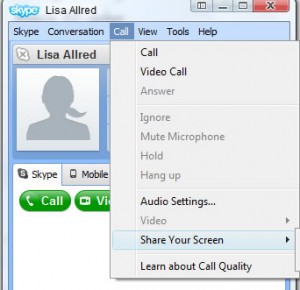
So for those of you who are Skype users, there is a feature that allows you to share your computer screen with the person you are talking to. Now this is all in real time. In order to make it work, you must:
- Have the most recent version of Skype. At the time of this article, the version I have is 4.1.0.166
- Click on the person you would like to call, which opens a separate window for them, click on “Call” in the list of commands up top, click on “Share Your Screen.” When you do this, it will tell you that an audio call will begin as well.
- OR, Call the person you would like to share your screen with, once they answer, click on “Call” in the command bar up top then click on “Share Your Screen.”
Very simple but high quality. I have used it several times already. It’s a great, quick way to share your screen without having to set up an account with some other screen sharing company. There is one catch, as of right now, you can only share your screen with just one person at a time. You cannot share your screen with multiple users by adding them to the conference call. Maybe this is a feature that will be added in the near future. That would be cool!
Skype is an amazing tool, especially if you are doing an international business. The rates are next to nothing and the quality of the calls are pretty good. It has significantly reduced my phone bills and keeps me connected to all those that I mastermind with on a regular basis. Business just gets easier and easier!

David Allred is the author and creator of CFW. David has been teaching entrepreneur minded people how to earn a full time income working from the comfort of home for nearly a decade.
Think about it. Never miss your kids’ events, set your own schedule, choose your own income and enjoy a lifestyle and income which most people only drool over!
Be sure to connect with David Allred on Google+, Facebook and everywhere else!


